The QSL card of FPAC nodes
A QSL card for a connection to an FPAC node, new in FPAC 4.2. Version française
The idea
After a radio contact, hams exchange QSL cards. FPAC nodes do the
same for a connection: a user connected to the node types
QS (for QSl) and receives a
card confirming the connection, made out to the user's callsign, with
the date and time.
The card is always shown as text in the session. On a node that offers it, such as F6BVP-8, it is also made as a picture: the node gives a link to download it with a web browser. A packet session only carries text, so the picture cannot go through it.
A sample card
Front side: the picture chosen by the sysop. Back side: the heading "FPAC node … confirming connection with …", your callsign, the date and time in UTC, then the description of the node (callsigns, ROSE address, city, locator, operating system, FPAC version).
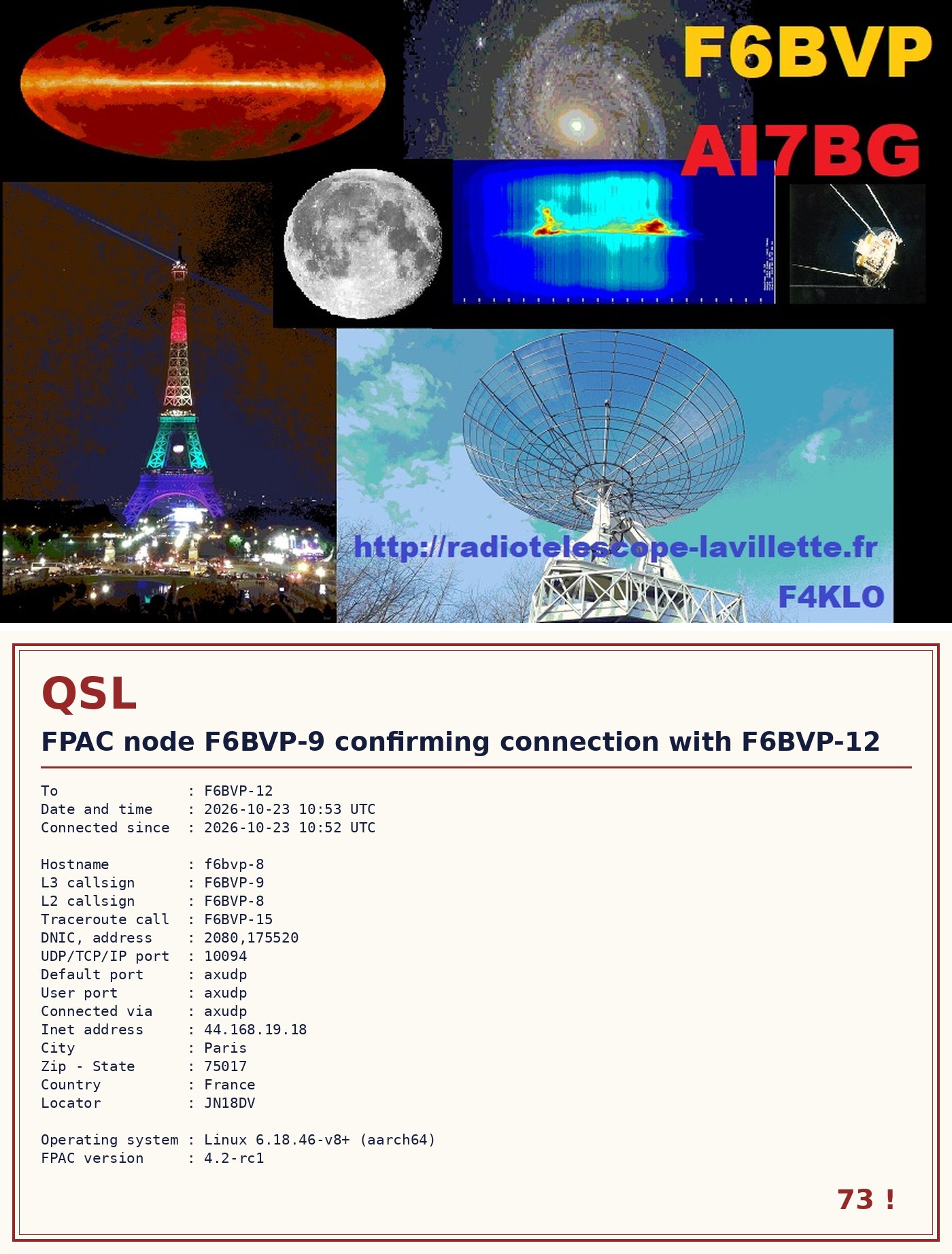
The same card, as shown in the session:
+----------------------------------------------------------------+
  QSL   FPAC node F6BVP-9 confirming connection with F6BVP-12

  To               : F6BVP-12
  Date and time    : 2026-10-23 10:53 UTC
  Connected since  : 2026-10-23 10:52 UTC

  Hostname         : f6bvp-8
  L3 callsign      : F6BVP-9
  L2 callsign      : F6BVP-8
  DNIC, address    : 2080,175520
  Connected via    : axudp
  City             : Paris
  Country          : France
  Locator          : JN18DV
  ...
  FPAC version     : 4.2-rc1
  73 !
+----------------------------------------------------------------+
Your QSL card as a picture: http://f6bvp.org/qsl/QSL-F6BVP-9-F6BVP-12-20261023-1053.jpg
Getting the card of F6BVP-8
Connect to node F6BVP-8 the way that suits you, then type
QS:
| Through | Command |
|---|---|
| ROSE (FPAC) | C F6BVP-8 2080175520 from your node |
| NetRom | C BVPN4 from a NetRom node that knows it |
| AX.25 over UDP | F6BVP-8, port 10094 of f6bvp.org |
| Internet (SSH) | see the home page of this site |
The card is made out to the callsign under which the connection reaches the node. Through an old FPAC node (before 4.1.6-rc9), it may bear the callsign of that node instead of yours.
Asking again within 10 minutes gives the same card. The pictures stay online for 30 days: download yours to keep it.
For sysops: the card on your own node
The QSl command is part of FPAC 4.2 (release candidate).
The text card works without any setting.
For the picture, the node needs:
- the Python imaging library:
apt install python3-pil; - a directory served by a web server, that the node can write to;
- two keywords, in
fpac.confor in a filefpacqsl.confnext to it:
QslDir   = /var/www/html/qsl          where the cards are written
QslUrl   = http://my.node.org/qsl     the same directory on the web
Optional: QslImage, the front picture (by default the
file QSL_fpac.jpg of the directory of
fpac.conf; JPEG or PNG, best at 1400 x 900 pixels, the
shape of a 14 x 9 cm card) and QslKeep, the number of days
the cards are kept (30 by default, 0 keeps them for ever).
The node does its own housekeeping: it erases the old cards, only
ever touches the files QSL-*.jpg of its directory, and
makes no picture beyond 500 cards. Each request is logged in
fpac/qsl.log.
The full user guide is the file doc/qsl.txt of the FPAC
sources; the design is described in section 18 of the FPAC 4.2 specification.